
RouterSoup — A Self-Hosted OpenRouter Alternative for Laravel
RouterSoup — A Self-Hosted OpenRouter Alternative for Laravel
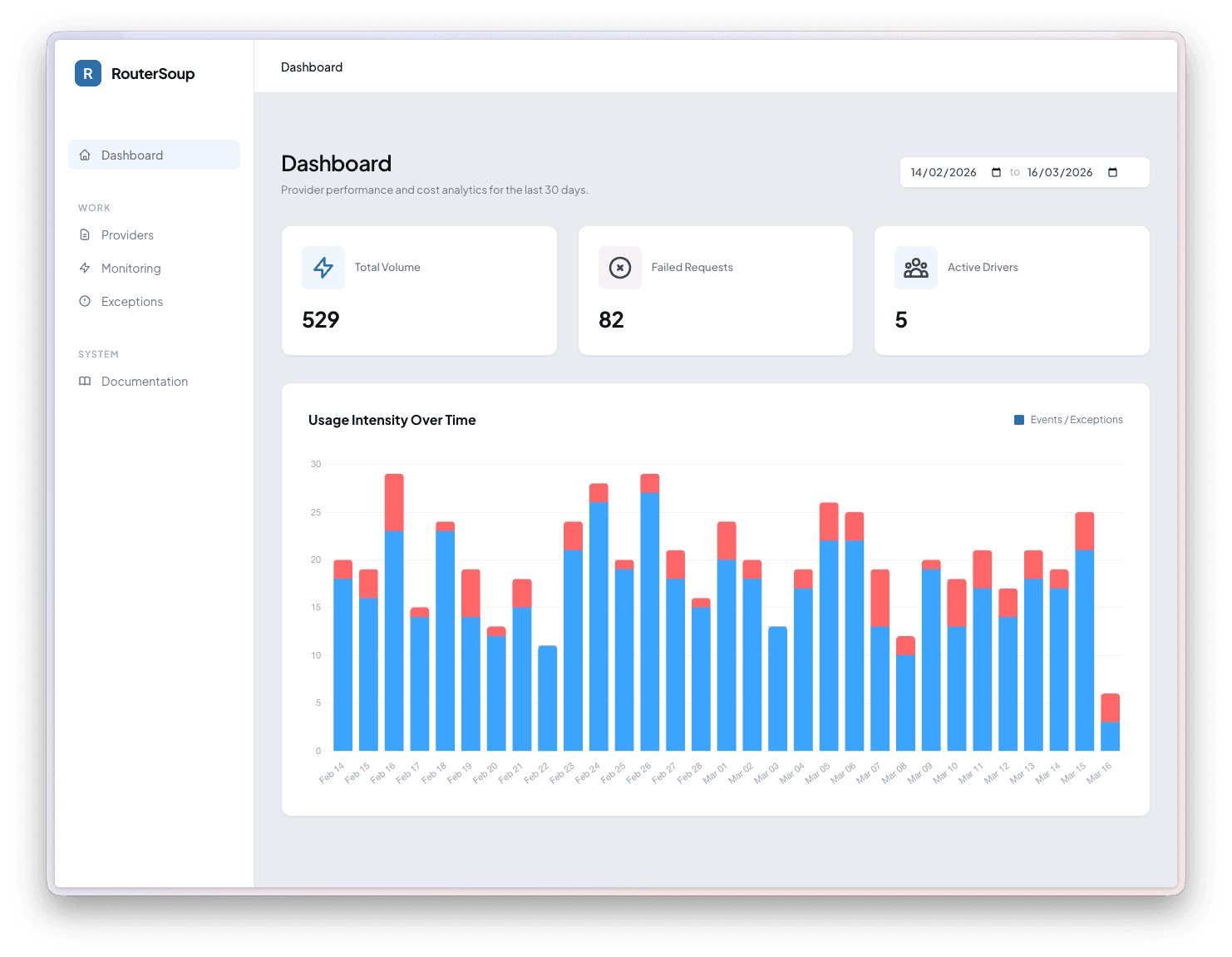
If you've ever worked with AI APIs in a Laravel application, you know the pain: managing rate limits across providers, juggling multiple API keys, and trying to keep track of which calls succeeded and which didn't. Services like OpenRouter solve some of these problems, but they come with their own trade-offs — you're routing sensitive prompts through a third-party, paying a markup, and giving up control.
That's why I built RouterSoup.
What is RouterSoup?
RouterSoup is a free, open-source Laravel package that gives you your own self-hosted AI provider router. It sits on top of Laravel AI and intercepts every AI call your application makes. Instead of hard-coding a single API key, you store multiple keys per provider and let RouterSoup rotate between them automatically.
Think of it as OpenRouter, but running inside your own Laravel app — no third-party dependency, no markup, full control.
Why I Built It
I was running a Laravel application that made heavy use of AI across multiple features — content generation, summarization, classification, and more. I quickly ran into a few problems:
- Rate limits: A single API key would hit rate limits during traffic spikes, causing failures.
- Cost distribution: I wanted to spread usage across multiple accounts and billing plans.
- Visibility: When something broke, I had no centralized place to see what happened.
- Key management: Swapping or disabling a key meant redeploying config changes.
I needed something that lived inside my stack, understood Laravel's ecosystem natively, and didn't require me to proxy requests through yet another external service. So I built RouterSoup.
Getting Started
Getting RouterSoup into your project takes about two minutes:
composer require heybardi/routersoup
Then run the install command to publish the config, migrations, and a service provider stub:
php artisan routersoup:install
php artisan migrate
Finally, enable it in your AppServiceProvider:
use HeyBardi\RouterSoup\RouterSoup;

class AppServiceProvider extends ServiceProvider
{
    public function boot(): void
    {
        RouterSoup::enable();
    }
}
That's it. Every Laravel AI call in your application now flows through RouterSoup. Head to /routersoup in your browser, add your API keys, and you're up and running.
Key Rotation Strategies
Not all workloads are the same, so RouterSoup ships with two rotation strategies:
| Strategy | What it does |
|---|---|
| Random | Picks a random active key each time. Simple, stateless, and good for general use. |
| Least Used | Picks the key that hasn't been used the longest. Spreads load evenly across all keys. |
You configure this in config/routersoup.php:
use HeyBardi\RouterSoup\Enums\RouterSoupRotation;

'rotation' => RouterSoupRotation::LeastUsed,
The Least Used strategy is particularly useful when you have keys on different billing tiers or rate limit buckets — it naturally balances the load so no single key gets hammered.
The Built-In Dashboard
One of the things I'm most proud of is RouterSoup's admin dashboard. Visit /routersoup and you get a full-featured control panel with four main sections:
- Dashboard — Provider usage analytics over the last 30 days with interactive charts.
- Providers — Add, edit, enable/disable, and delete API keys without touching config files or redeploying.
- Monitoring — Browse every Laravel AI event with full request and response payloads.
- Exceptions — Failed provider calls with error details and stack traces.
The entire dashboard is built with Livewire — no frontend build step required. It just works out of the box.
Authorization & Security
Security was a first-class concern. In local environments, the dashboard is open for convenience. In production, access is controlled through a viewRouterSoup gate:
// app/Providers/RouterSoupServiceProvider.php

protected function gate(): void
{
    Gate::define('viewRouterSoup', function ($user) {
        return in_array($user->email, [
            'you@example.com',
        ]);
    });
}
Your API keys are stored in your own database, on your own infrastructure. No third party ever sees them.
Keeping Things Clean
AI events can pile up fast. RouterSoup includes a prune command you can schedule:
$schedule->command('routersoup:prune')->daily();
By default it keeps the last 24 hours of events. Need a longer window? Pass --hours:
php artisan routersoup:prune --hours=72
Requirements
RouterSoup requires PHP 8.3+, Laravel 11+, and Laravel AI. It's fully tested with Pest and statically analyzed with PHPStan.
Open Source
RouterSoup is released under the MIT license and is fully open source. You can find the code, file issues, and contribute on GitHub.
If you're building Laravel applications that interact with AI providers, give RouterSoup a try. It might just save you from the next rate-limit headache.